
Vegastars App NZ: No Store App, So Here’s the PWA and How to Install It
Short answer: Vegastars has no App Store, Google Play or APK app. What people call the “Vegastars app” is a Progressive Web App (PWA) added from vegastars12.com: on an iPhone through Safari (Share → Add to Home Screen), on Android through Chrome (⋮ menu → Install app). Installing is free and takes four steps, about a minute, after which the icon opens the same site with the same account. Any APK carrying the Vegastars name was made by someone else.
Search for a Vegastars app download and plenty of pages offer one. Vegastars itself doesn’t. On 9 October 2026 the addresses /en-NZ/app/, /en-NZ/mobile-app/ and /en-NZ/download/ on vegastars12.com all returned 404 errors, and on 2 October we found no store link on the site, in its footer or in any of its 42 Help Centre articles. What Vegastars does publish is a web app manifest and a service worker, the two files that allow a browser to install a website like an app. The licence, bonus and banking basics sit on our Vegastars NZ casino page.
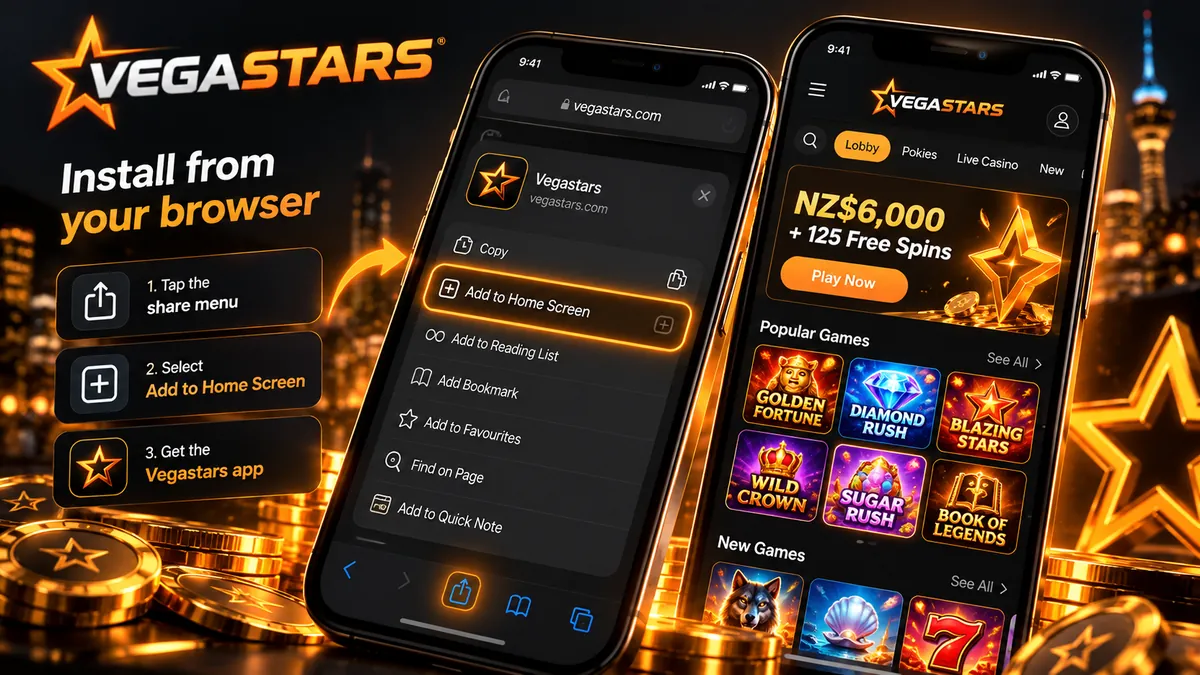
Store app, APK or PWA: what exists for Vegastars
Look for the app and five options come up. Only two of them exist, and the ordinary browser tab covers nearly everything the installed icon does.
| Option | Available? | How you get it | What you get and what’s missing |
|---|---|---|---|
| Vegastars PWA (home-screen icon) | Yes | Safari: Share → Add to Home Screen. Chrome on Android: ⋮ → Install app | Full screen without an address bar, its own icon and launch screen, the same account, updates with the site. No offline play; no push alerts found |
| Mobile browser tab | Yes | Type vegastars12.com | The same games, cashier and verification; rotates freely; shares your browser’s sign-in |
| App Store app (iPhone, iPad) | No | No listing linked from Vegastars’ site or Help Centre | Nothing to install; add the PWA instead |
| Google Play app (Android) | No | No Vegastars listing; “VegasStar Casino – Slots Game” is another developer’s app | Nothing to install; add the PWA instead |
| APK file | No | Vegastars publishes none | Third-party APKs aren’t from Vegastars and need installs from unknown sources |
What’s inside the Vegastars PWA
How the installed version behaves comes down to two public files, both of which we read on 9 October 2026.
The manifest
vegastars12.com/manifest.json names the app “Vegastar”, without the final s, which may be the label under your icon (iPhone lets you rename it while installing). Standalone display hides the address bar and browser buttons, and the orientation is set to portrait. Icons come in 192 and 512 pixel sizes, including maskable versions that Android trims to its own shape. Android draws the launch screen from the dark background colour (#252632), and the orange theme colour (#FF9416) tints the status bar. The start address, /?utm_source=pwa_install, only tags launches from the icon for Vegastars’ analytics. Balance, bonuses and game history are those of your normal account.
For iPhone and iPad, the page code adds Apple’s own tags: an app-capable flag, a 180 pixel touch icon and 13 launch images, eight sized for iPhones and five for iPads. That’s why the icon opens on a Vegastars splash screen, and why the PWA works on a tablet as well.
The service worker
The service worker, sw.js, is built with Google’s Workbox library. It stores the site’s code, styles and fonts on the device so repeat launches load faster, fetches the start page from the network first with a fallback copy up to a day old, and shows a placeholder page at /_offline when there’s no connection. We found no push-notification code in the service worker or in the site’s main script.
How to install the Vegastars PWA
Menu names and button positions shift from one browser or operating-system version to the next, so match the wording below to what you see. Before installing, make sure the address reads vegastars12.com, because the icon will keep opening whatever page it was created from.
iPhone and iPad (Safari)
- Open Safari and go to vegastars12.com.
- Tap the Share button, the square with an upward arrow. Depending on your iOS version it sits in the bottom toolbar or behind the ••• button beside the address.
- Scroll the list of actions and tap Add to Home Screen. If it’s missing, look under Edit Actions or More at the bottom of the list.
- Keep or edit the name, leave Open as Web App switched on if your iOS shows that switch, and tap Add.
Now open the icon and sign in. The installed version keeps its own storage apart from Safari, so a Safari session doesn’t carry over. Chrome, Edge and Firefox on recent iOS versions offer a similar option in their own menus. Deleting the icon later removes nothing from your account.
Android (Chrome)
- Open Chrome and go to vegastars12.com.
- Tap the ⋮ menu in the top-right corner.
- Tap Install app. Some versions say Add to Home screen and then offer Install or Create shortcut: choose Install.
- Confirm with Install. A banner at the bottom of the screen offering to install the app does the same job.
The manifest has what Chrome checks before offering a full installation (a name, 192 and 512 pixel icons, standalone display and a start address), so the icon usually appears in the app drawer as well, and the app shares Chrome’s sign-in. Samsung Internet, Edge and Firefox use labels such as Add page to or Add to Home screen. On a computer, Chrome and Edge show an install icon at the right end of the address bar.
If the install option doesn’t appear
| What you see | Likely reason | What to do |
|---|---|---|
| No Add to Home Screen or Install option at all | The link opened inside Telegram, Instagram, Facebook or another app’s built-in browser | Choose Open in Safari or Open in Chrome, or type vegastars12.com into the browser yourself |
| The installed app stays upright when you turn the phone | The manifest sets portrait orientation | For a sideways view of live tables, play in an ordinary browser tab |
| The icon opens a site other than vegastars12.com | It was installed from a lookalike page | Delete the icon, change your password if you signed in there, and reinstall from vegastars12.com |
Lookalike apps and APK files to avoid
The wrong app usually comes from a search result. We looked at Brave Search’s New Zealand top ten for “vegastars app” on 2 October 2026, and none of the ten links led to a Vegastars domain.
An APK from those results was built by someone other than Vegastars, which publishes none. To install it you have to switch on installs from unknown sources, which Android warns against. A file like that can request permissions a casino site never needs, and a fake login screen can pass your password and card details to someone else. The PWA avoids that route entirely. It runs inside your browser’s sandbox and asks for no phone permissions when you add it; each launch opens vegastars12.com. Our Vegastars security guide explains how to check a domain and spot a cloned login page.
What works in the phone version
Because the PWA is the mobile website in a window of its own, the whole site comes with it.
Games lobby and demo play
The lobby’s Pokies filter showed 5,484 titles on 2 October 2026, out of about 6,000 games from 37 studios including live. A good number of slots load in demo mode before you sign in, which costs nothing and shows how a game fits your screen before any money goes in. Studios and RTP figures are on our Vegastars games page.
Live tables
Live games have no demo mode. Evolution supplies 461 live titles, and Pragmatic Play Live runs four Vegastars-branded tables, among them Vegastars Blackjack and Vegastars Roulette. A video stream eats far more mobile data than a pokie, so for long sessions Wi-Fi is the better choice. Formats and tables are covered under Vegastars live tables.
Cashier and withdrawals
The cashier matches the desktop one: Visa, Mastercard, Skrill, Neteller and 16 cryptocurrencies, with exact limits shown before you confirm. The Help Centre puts approval of most withdrawals at about an hour, and while a request is still pending you can cancel it in Transaction History. Clause 12.3.2 of the terms doesn’t offer Mastercard payouts to New Zealand, so money paid in by Mastercard comes back by bank transfer. Methods are compared in Vegastars deposit options for NZ.
Sign-up and ID verification
You can register inside the PWA as well, following the order in our Vegastars account setup guide. For verification the phone camera is the right tool. Vegastars asks for an original photo of a passport, a driver licence or a government ID card with all four of the document’s corners in the shot, and it turns down scans and screenshots. Sumsub runs the automatic check in under five minutes on average; if your documents go to manual review, allow up to 24 hours.
Signing in and checking who runs the site
There’s no separate app account: the icon takes the same email and password you use on a computer. Vegastars’ Help Centre tells players to trust vegastars12.com and nothing else, and vegastars.com forwards to it. Check the domain before you tap Add, because the installed PWA hides the address bar and afterwards there’s nothing on screen to check. Password resets, locked accounts and live chat are covered in our Vegastars login guide.
The icon doesn’t change who you’re dealing with. Behind Vegastars is Neptune Projects S.R.L. of Costa Rica, whose B2C entry on the Tobique Gaming Commission’s public register is valid to 22 August 2027 (checked 2 October 2026). Vegastars is operated from outside New Zealand and does not hold a New Zealand licence. No online casino holds one yet: under the Online Casino Gambling Act 2026, the Department of Internal Affairs (DIA) expects to start issuing up to 15 licences from early 2027. The DIA says New Zealanders are not breaking the law by playing at overseas casinos that were already serving New Zealand before 1 May 2026, but it describes this as an unregulated activity with no guarantee of player safety. New Zealand player protections do not apply. From 1 December 2026, providers that have not applied for a New Zealand licence must stop serving New Zealand customers. The DIA’s page for players has the current position.
TG50 free spins on your phone
TG50 is the only Vegastars promo code confirmed for New Zealand, and it is claimed through Telegram, which makes a phone with the Telegram app the obvious device for it. In the PWA, sign in, scroll down the homepage to the Telegram banner and tap Get Free Spins. That opens the Vegastars bot in Telegram; finish the bot’s steps and then enter TG50. The reward is 50 free spins at NZ$0.20 each, with winnings wagered 40x (T&Cs apply). Our Vegastars Telegram free spins page sets out the claim route in full.
What the PWA doesn’t give you
- No installation bonus. No New Zealand promotion is tied to the app. The welcome package of up to NZ$6,000 + 125 free spins over three deposits (40x wagering on deposit plus bonus, T&Cs apply) is the same on any device.
- No lock-screen alerts. We found no push-notification code, so weekly free spins and Instant Cashback show up only when you open your account.
- No offline play. Without a connection you get the /_offline placeholder page and nothing else.
- No separate limits. Deposit, loss and wager limits, time-outs and self-exclusion belong to the account, so whatever you set on a computer applies in the app too.
A casino a single tap away on your home screen is also easier to open on impulse. If that worries you, set a deposit limit before installing, or leave the icon off and stick to the browser. Gambling is for adults 18+. If gambling is a problem for you or someone close to you, call the Gambling Helpline free on 0800 654 655 or text 8006, any time.
Vegastars app FAQ
Is the Vegastars app free?
Yes. Nothing is bought or downloaded from a store: the PWA is the Vegastars website saved to your home screen, and adding it costs nothing beyond the data your browser uses. Real-money play is a separate step, open only to adults 18+.
How do I update the Vegastars APK?
There’s no Vegastars APK to update. The PWA updates itself: when Vegastars changes its site, the service worker replaces its stored copy of the code, and the next launch with a connection shows the new version. An APK offering Vegastars updates came from another source, so uninstall it and change your password if you signed in through it.
Is the Vegastars casino app safe to download?
There’s nothing official to download, and APK files using the Vegastars name aren’t from the operator. The PWA opens vegastars12.com inside your browser’s sandbox and asks for no phone permissions when you add it. What it can’t change is the operator’s status. There is no New Zealand licence behind Vegastars, and in the DIA’s description, play at offshore casinos is unregulated, with no guarantee of player safety.
Does the Vegastars app work offline?
Only as far as a placeholder screen. Games, balances, the cashier and live tables all need the internet, so without a connection the PWA shows its offline page. Reconnect and reopen the icon to carry on.
Is there a Vegastars app bonus?
No. Vegastars’ New Zealand promotions include nothing for installing the PWA. The offer best suited to a phone is TG50, which gives 50 free spins at NZ$0.20 each once you link the Vegastars Telegram bot, with winnings wagered 40x (T&Cs apply).
Can I play Vegastars pokies on my phone in New Zealand?
Technically, yes: the 5,484 pokies in the lobby (2 October 2026) run in the phone browser and in the PWA, many with a free demo. The legal side is a separate question. Vegastars has no New Zealand licence, New Zealand player protections don’t apply, and offshore providers without a licence application must stop serving New Zealand customers from 1 December 2026. Check the DIA’s player guidance before you deposit.